---
title: "2FA: Two-Factor Authentication"
description: Improve security with two factor authentication. This is optional, but recommended for your INTIX account.
---
[Skip to content](https://customer.intix.com/2fa#main-content)

- [Customer Support](https://customer.intix.com/support)
- [Sign out](https://customer.intix.com/_hcms/mem/logout)
Open main navigation
Close main navigation
- [Customer Support](https://customer.intix.com/support)
- [Sign out](https://customer.intix.com/_hcms/mem/logout)
How can we help you?
- There are no suggestions because the search field is empty.
1. [INTIX Customer Support](https://customer.intix.com/?hsLang=en-au)
2. [Account](https://customer.intix.com/account?hsLang=en-au)
# 2FA: Two-Factor Authentication
## Tighter security is a top priority - and is available to you on INTIX!
This is an **optional** feature available in your account settings.
**What you'll need to start:**
- **An authenticator app** installed on your smartphone.
- Example free authenticator apps available in your iOS or Android app store: *Google Authenticator, Authy, Microsoft Authenticator*.
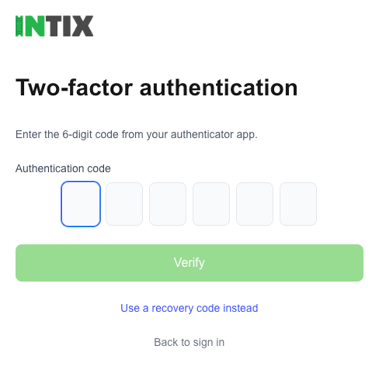
Once 2FA is enabled, you'll need both your password and a 6-digit code from your authenticator app to sign in.
You can disable 2FA anytime. [Jump to Disable 2FA](https://customer.intix.com/2fa#disable-2FA).
#### Enable Two-Factor Authentication (2FA) on your INTIX account
Login to INTIX:
AU - [intix.com.au](http://intix.com.au/)
NZ - [intix.co.nz](http://intix.co.nz/)
UK - [intix.co.uk](https://www.intix.co.uk/)
US - [intix.com](http://intix.com/)
1. My Account \> My Settings \> Two-Factor Authentication \> **Enable 2FA**
2. Enter your INTIX account password
3. Open your authenticator app and scan the QR code displayed in your INTIX account (easiest and quickest way)
**-OR-**
Copy the key from underneath the QR code in your INTIX account and go to your authenticator app to set up a new code generator, and paste the key when prompted (backup method)
4. Generate recovery codes. Save these codes somewhere safe (but handy). These are used when you don't have access to your authenticator app, and you need to use one of your 10 one-time-codes to log in instead.
#### Logging into INTIX going forward looks like this!
#### Disable Two-Factor Authentication (2FA)
1. My Account \> My Settings \> Two-Factor Authentication \> **Disable 2FA**
2. Enter your INTIX password and the 6-digit code from your authenticator app
(OR, use one of your Recovery Codes)
#### Common questions:
**My code isn't working.**
- Codes change every 30 seconds. Make sure they're entering the *current* one, not one that just expired.
- Make sure the phone's clock is set to "automatic time" (some authenticator apps drift if the phone's clock is manual).
- After 5 wrong tries the system blocks further attempts for that sign-in. They'll need to start the sign-in over from scratch.
**I lost my phone.**
- Direct them to use one of their saved **backup codes** - they were shown a list of 10 when they first set up 2FA. Each one works once and lets them sign in like a normal code.
- On the sign-in page, there's a "Use a recovery code instead" link that takes them to a separate screen for this.
**I've lost my phone AND my backup codes.**
- This is the manual support case. Escalate to engineering. There's a quick DB fix to clear 2FA off the account so the user can sign in with just their password again. We'll then encourage them to set it up again with the new phone.
**I want to turn it off.**
- They can. Same settings area, "Disable 2FA". It requires their password and one current code (or one backup code).
- They'll get an email confirming the change - that's expected.
*Questions? Email help@intix.com*
- [Account](https://customer.intix.com/account?hsLang=en-au)
- [General](https://customer.intix.com/general?hsLang=en-au)
- [Membership & Ticket Packages](https://customer.intix.com/membership-ticket-packages?hsLang=en-au)
- [Resale](https://customer.intix.com/resale?hsLang=en-au)
- [FAQs](https://customer.intix.com/faqs?hsLang=en-au)
- [Troubleshooting](https://customer.intix.com/troubleshooting?hsLang=en-au)
[](http://intix.com)
[mailto:help@intix.com](mailto:help@intix.com)