---
title: How to Accept a Complimentary Ticket
description: How to accept a ticket into your account from another attendee's account.
---
[Skip to content](https://customer.intix.com/accept-complimentary-ticket#main-content)

- [Customer Support](https://customer.intix.com/support)
- [Sign out](https://customer.intix.com/_hcms/mem/logout)
Open main navigation
Close main navigation
- [Customer Support](https://customer.intix.com/support)
- [Sign out](https://customer.intix.com/_hcms/mem/logout)
How can we help you?
- There are no suggestions because the search field is empty.
1. [INTIX Customer Support](https://customer.intix.com/?hsLang=en-au)
2. [General](https://customer.intix.com/general?hsLang=en-au)
# How to Accept a Complimentary Ticket
## You will receive a notification via email that an event organiser has issued you a ticket.
#### Click the link in the email to attach this ticket to your account :
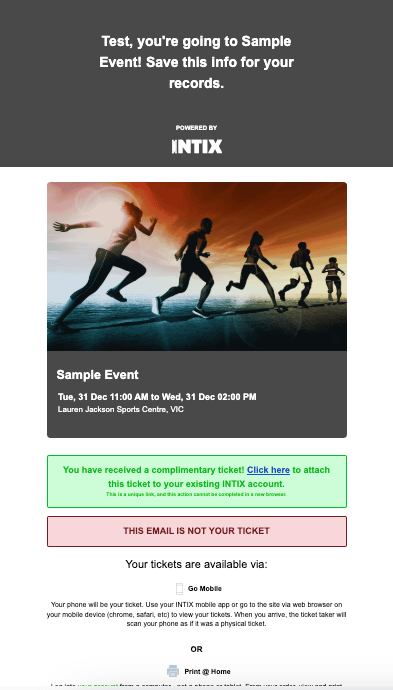
This takes you to the login page:
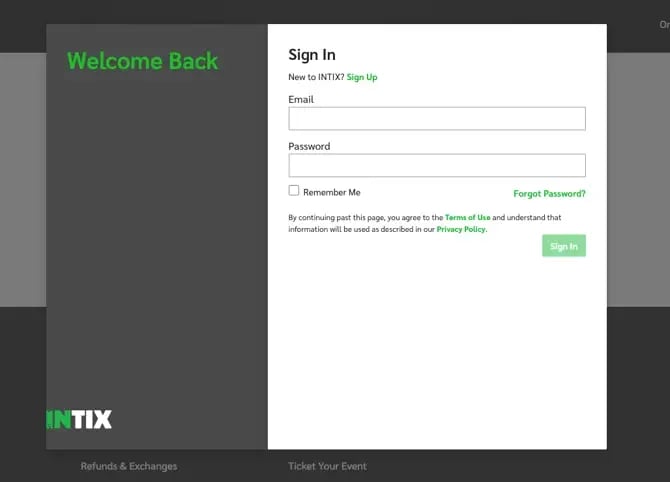
### If you have an INTIX account:
1. Click the "**Accept**" button from the email.
2. **Log in** with your email address and password.
This attaches the ticket to your account, and you'll see it in "My Tickets".
### If you don't have an INTIX account yet:
1. Click the link from the email.
2. Click "**Sign Up**" from the login page and follow the prompts to create a password
This attaches the complimentary ticket to your account, and you'll see it in "My Tickets".
**IMPORTANT INFORMATION:**
- A ticket is only in your account once you have accepted it via the email notification. If you don't accept it by clicking the link, it is not in your account.
*Questions? Email help@intix.com*
- [Account](https://customer.intix.com/account?hsLang=en-au)
- [General](https://customer.intix.com/general?hsLang=en-au)
- [Membership & Ticket Packages](https://customer.intix.com/membership-ticket-packages?hsLang=en-au)
- [Resale](https://customer.intix.com/resale?hsLang=en-au)
- [FAQs](https://customer.intix.com/faqs?hsLang=en-au)
- [Troubleshooting](https://customer.intix.com/troubleshooting?hsLang=en-au)
[](http://intix.com)
[mailto:help@intix.com](mailto:help@intix.com)