---
title: "Sign Up: Create an account and buy a ticket"
description: Create and account in the checkout process from an event's ticket page.
---
[Skip to content](https://customer.intix.com/create-account-buy-ticket#main-content)

- [Customer Support](https://customer.intix.com/support)
- [Sign out](https://customer.intix.com/_hcms/mem/logout)
Open main navigation
Close main navigation
- [Customer Support](https://customer.intix.com/support)
- [Sign out](https://customer.intix.com/_hcms/mem/logout)
How can we help you?
- There are no suggestions because the search field is empty.
1. [INTIX Customer Support](https://customer.intix.com/?hsLang=en-au)
2. [Account](https://customer.intix.com/account?hsLang=en-au)
# Sign Up: Create an account and buy a ticket
#### To buy a ticket with an account:
From the event's ticketing page, select your tickets or seats and click "Checkout".
This brings you to the INTIX Sign in page, before you get to the checkout page.
If you don't already have an account, click **Sign Up**.
Enter your **email address** and **create a password**.
Your password must:
1. - Be at least **8 characters** long
- Include at least **one number** (0–9)
- Include at least **one uppercase letter** (A–Z)
- Include at least **one lowercase letter** (a–z)
- For added security, consider including a **special character** ($, #, @, &, \*)
### 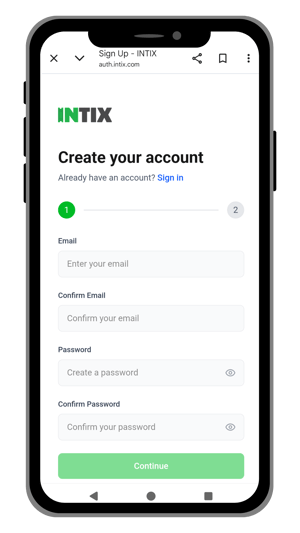 Enter your name and other required details.
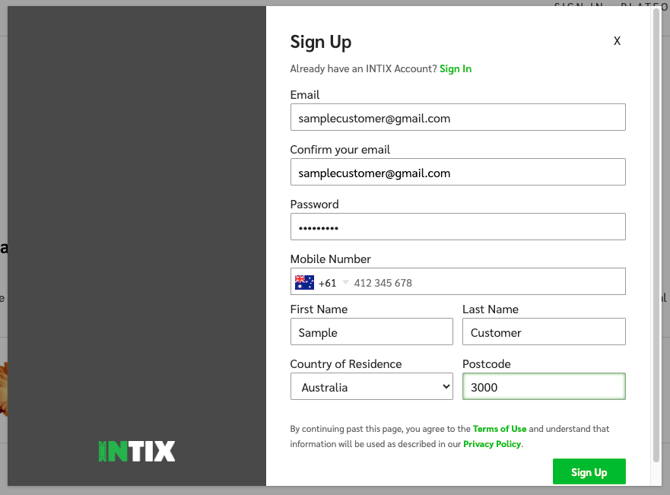
### Your email and password will be your log in details going forward.
Complete your ticket purchase.
You can log in to view, print, or download your tickets in your account anytime.
Log in to INTIX:
AU - [intix.com.au](http://intix.com.au/)
NZ - [intix.co.nz](http://intix.co.nz/)
UK - [intix.co.uk](https://www.intix.co.uk/)
US - [intix.com](http://intix.com/)
You can also download our free app from the App Store or Google Play to have your tickets on your phone at all times.
**Use the same account information (email address and password) to sign in.**
#### Troubleshooting tips:
- Try a different device. Sometimes things are easier to see on the big screen!
- Try a different browser (we suggest Chrome)
- If you're using a laptop with an external screen - be sure the browser window is on the laptop. Computers don't like creating passwords on external screens.
#### GUEST CHECKOUT
Event organisers may opt to enable Guest Checkout for their events. This gives you the option to purchase tickets without creating an INTIX account. You will still need to provide details for the ticket purchase and delivery, as required by the event organiser (ie. name and email address etc).
Keep in mind that if you use Guest Checkout, it is much more difficult to provide customer service if, for example, you accidentally deleted the confirmation/ticket emails, or made a typo when entering the email address for tickets to be sent to.
*If you used Guest Checkout and need assistance, contact [help@intix.com](mailto:help@intix.com)*
- [Account](https://customer.intix.com/account?hsLang=en-au)
- [General](https://customer.intix.com/general?hsLang=en-au)
- [Membership & Ticket Packages](https://customer.intix.com/membership-ticket-packages?hsLang=en-au)
- [Resale](https://customer.intix.com/resale?hsLang=en-au)
- [FAQs](https://customer.intix.com/faqs?hsLang=en-au)
- [Troubleshooting](https://customer.intix.com/troubleshooting?hsLang=en-au)
[](http://intix.com)
[mailto:help@intix.com](mailto:help@intix.com)