
Log in to INTIX to view your tickets:
AU - intix.com.au
NZ - intix.co.nz
UK - intix.co.uk
US - intix.com
Below are the most used features that you can self-manage.
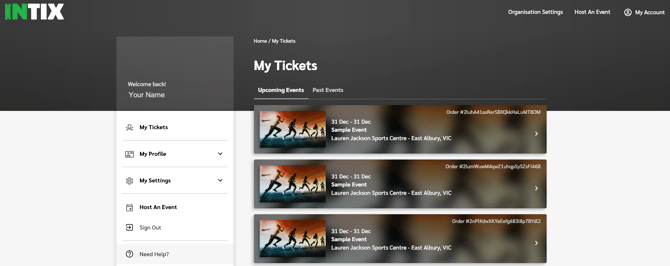
Click on My Profile to:
- Change your contact phone number:
My Profile > Profile Details > Update Mobile Number > Add Number - Change your password
-
Your password must:
- Be at least 8 characters long
- Include at least one number (0–9)
- Include at least one uppercase letter (A–Z)
- Include at least one lowercase letter (a–z)
- For added security, consider including a special character ($, #, @, &, *)
-
- Manage your Two-Factor Authentication
- Add Favourites - subscribe to Organisations, get notified when Events and Memberships are live
- Linked Accounts - if an organisation that you are affiliated with has their own app, link it with your INTIX account to view your memberships and tickets
Click on My Settings to:
- Contact Preferences - to unsubscribe from (or re-subscribe to) an organisation or club that you have previously interacted with
- Two-Factor Authentication recovery codes + enable or disable 2FA
- Delete your account (Important! This is permanent, and you will lose access to your tickets and memberships)
Click on "Need Help?" to:
- Search and browse the guides in our extensive Help Centre - Need Help
Need to update something you can't edit?
Some account details can’t be changed directly by you. No problem — our Support Team can help!
Please email us at help@intix.com with the following information:
- Your first and last name
- The email address currently linked to your INTIX account
- The change you would like us to make
Email Address
Your email address cannot be changed.
Your INTIX account is linked to your unique email address. If you’d like to use a different email address to access your tickets, the easiest option is to create a new INTIX account using your preferred email address.
Once your new account has been created, simply forward your tickets from your old account to your new account, and you’ll be ready to go!
Need help? Email help@intix.com
Be sure to include pertinent details (event or organisation) in your enquiry.