---
title: "Pay my Unpaid Order: Reserved Seating event"
description: "Event organisers can create Unpaid Orders for their customers for reserved seating events.\nThey can hold your seat, send you the invoice, and you complete the purchase from within your online account."
---
[Skip to content](https://customer.intix.com/pay-unpaid-order-reserved-seat-event#main-content)

- [Customer Support](https://customer.intix.com/support)
- [Sign out](https://customer.intix.com/_hcms/mem/logout)
Open main navigation
Close main navigation
- [Customer Support](https://customer.intix.com/support)
- [Sign out](https://customer.intix.com/_hcms/mem/logout)
How can we help you?
- There are no suggestions because the search field is empty.
1. [INTIX Customer Support](https://customer.intix.com/?hsLang=en-au)
2. [General](https://customer.intix.com/general?hsLang=en-au)
# Pay my Unpaid Order: Reserved Seating event
## Event organisers can create Unpaid Orders for their customers for reserved seating events.
They can hold your seat, send you the invoice, and you complete the purchase from within your online account!
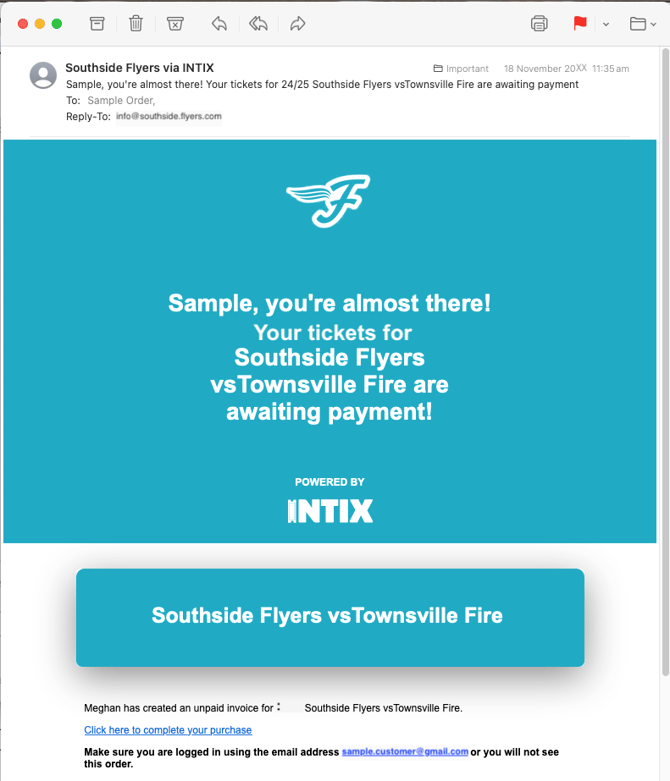
When an Unpaid Order is created, you will receive an email and push notification letting you know that you have an order awaiting payment.
**NOTE:** The link in the email is the way the order is connected to your account, so it is imperative to get to the order by clicking the link from the notification email.
1. **Click the link from within the email.**
2. **Log into your INTIX account** using your email address and password. If you don't have an account already, click "sign up" to create your account.
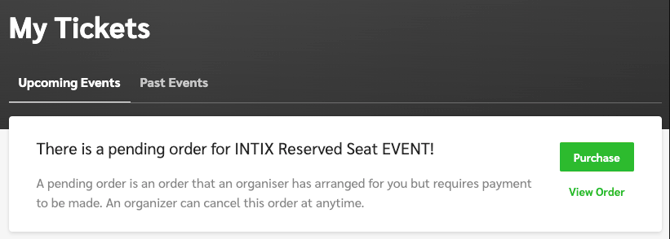
From the link in your notification email, you will be directed to log into your INTIX account. On your account page, you will see a notification advising you of pending orders to be paid.
You can see the full details of the order including seating details using the **blue** information drop down before entering your card details. 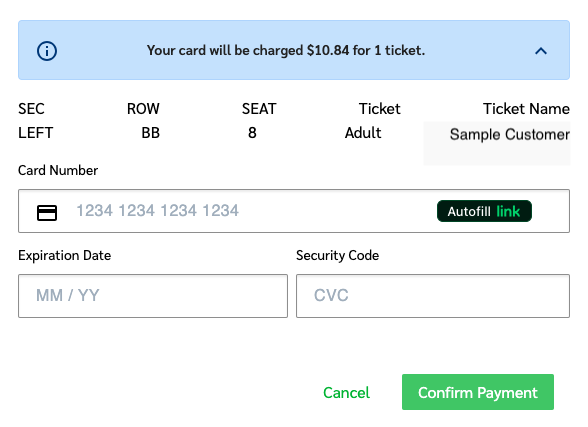
### Your ticket will be visible in the free INTIX app once the payment is completed.
You will also receive an order payment confirmation via email.
*Need help? Email [help@intix.com](mailto:help@intix.com).
Be sure to note the event and date in your enquiry.*
- [Account](https://customer.intix.com/account?hsLang=en-au)
- [General](https://customer.intix.com/general?hsLang=en-au)
- [Membership & Ticket Packages](https://customer.intix.com/membership-ticket-packages?hsLang=en-au)
- [Resale](https://customer.intix.com/resale?hsLang=en-au)
- [FAQs](https://customer.intix.com/faqs?hsLang=en-au)
- [Troubleshooting](https://customer.intix.com/troubleshooting?hsLang=en-au)
[](http://intix.com)
[mailto:help@intix.com](mailto:help@intix.com)