---
title: How to Unsubscribe from notification emails
description: You can easily unsubscribe (or re-subscribe) from receiving emails from an organisation or club from within your account.
---
[Skip to content](https://customer.intix.com/unsubscribe-notification-emails#main-content)

- [Customer Support](https://customer.intix.com/support)
- [Sign out](https://customer.intix.com/_hcms/mem/logout)
Open main navigation
Close main navigation
- [Customer Support](https://customer.intix.com/support)
- [Sign out](https://customer.intix.com/_hcms/mem/logout)
How can we help you?
- There are no suggestions because the search field is empty.
1. [INTIX Customer Support](https://customer.intix.com/?hsLang=en-au)
2. [Account](https://customer.intix.com/account?hsLang=en-au)
# How to Unsubscribe from notification emails
## You can easily unsubscribe (or re-subscribe) from receiving emails from an organisation or club from within your account.
#### This is what it looks like in the account view:
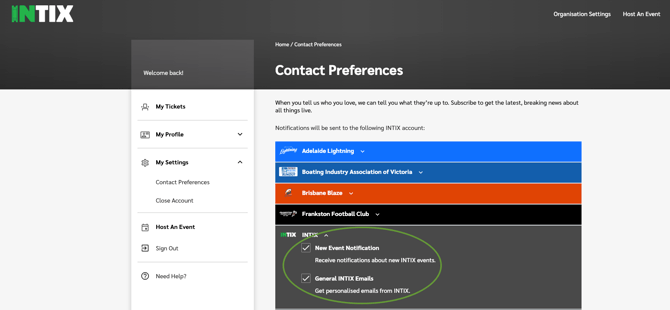
You can look at your account to see where you are connected to clubs and organisations you have had tickets and memberships with.
#### To unsubscribe oneself from an organisation's audience:
1. Log in to INTIX:
AU - [intix.com.au](http://intix.com.au/)
NZ - [intix.co.nz](http://intix.co.nz/)
UK - [intix.co.uk](https://www.intix.co.uk/)
US - [intix.com](http://intix.com/)
2. My Settings \> Contact Preferences
3. Click the organisation you want to unsubscribe from and uncheck the appropriate boxes
**NOTE**: You can just as easily re-subscribe to an organisation if this was done in error.
*Need help? Email us at [help@intix.com](mailto:help@intix.com)*
**Push Notifications**: To unsubscribe from receiving pop-up notifications on your phone, go to the Settings in your phone and manage which apps can send through push notifications from there.
- [Account](https://customer.intix.com/account?hsLang=en-au)
- [General](https://customer.intix.com/general?hsLang=en-au)
- [Membership & Ticket Packages](https://customer.intix.com/membership-ticket-packages?hsLang=en-au)
- [Resale](https://customer.intix.com/resale?hsLang=en-au)
- [FAQs](https://customer.intix.com/faqs?hsLang=en-au)
- [Troubleshooting](https://customer.intix.com/troubleshooting?hsLang=en-au)
[](http://intix.com)
[mailto:help@intix.com](mailto:help@intix.com)